> For the complete documentation index, see [llms.txt](https://help.daasity.com/llms.txt). Markdown versions of documentation pages are available by appending `.md` to page URLs; this page is available as [Markdown](https://help.daasity.com/support/faq/ecom-product-dimensions.md).
# Ecom Product Dimensions
This article is meant to help you understand the proper dimensions to use when analyzing your product data.
## Most recent data vs. data at time of sale
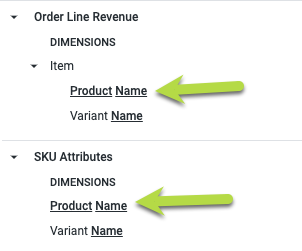
The **Order Line Revenue** and **Transactional Sales** explores contain some product dimensions that may seem redundant, like Product Name and Variant Name:
The difference between these is whether they represent the most recent values or the values at the time of the purchase.
Product data in the **Order Line Revenue** and **Transactional Sales** **Report** views represent product data ***at the time of sale***.
On the other hand, product data in the **SKU Attributes** view will show you ***the most recent attributes*** for each product.
For example, let's say you launch a new shirt on your website called The Puffy Shirt. You sell the product for the whole month of April, but at the end of the month your legal department requires you to add a trademark symbol to the name. So you on May 1 you change the name to The Puffy Shirt™.
When you analyze the sales data for this product at the end of May, the Product Name dimension from the **Order Line Revenue** and **Transactional Sales Report** views will have two values: `The Puffy Shirt` (from the sales in April before you changed the name) and `The Puffy Shirt™` (from the sales in May after you changed the name).
If you use the **SKU Attributes** Product Name dimension, though, there will only be one value: `The Puffy Shirt™` because that is the most recently updated value for that product.
{% hint style="info" %}
**We recommend using the SKU Attributes dimensions**
In general, using the SKU Attributes dimensions will make your analysis easier because you won't have to account for past versions of your product attributes.
{% endhint %}
{% hint style="info" %}
**Customizing how SKU Attributes works**
If you are an Enterprise merchant and want to view or customize the code that creates the `drp.sku_attributes` table, you should look at the following script: [6510\_PLN\_BAS\_sku\_attributes.sql](https://github.com/Daasity/platform-sql-shared/blob/master/scripts/base/6500_merchandising_planning/6510_PLN_BAS_sku_attributes.sql).
{% endhint %}
## SKU vs. Listing SKU
If you sell the same product on your own ecommerce platform and Amazon, you can map the SKUs so that you don't have multiple SKUs show up in your reports for the same product. You do this using the [SKU Mapping BSD](/core-concepts/custom-data-and-enrichment/custom-attributes/products-and-hierarchy/sku-mapping.md) sheet.
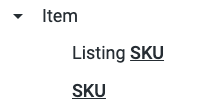
When you analyze your product data by SKU in your explores, there typically will be two options: SKU and Listing SKU.
Use the SKU dimension if you want the normalized SKU value that has been updated according to your SKU Mapping BSD. If you do not have your SKU Mapping BSD filled out, this will always be the raw value from the source system (e.g.: Amazon or Shopify).
The Listing SKU dimension will always have the original value from the source system before SKU Mapping has been applied. So even if you have set up SKU Mapping for your Amazon SKUs, this dimension will still contain the raw value out of Amazon. For non-Amazon sales channels, the Listing SKU will always be the same as the SKU.
{% hint style="info" %}
**Viewing the SKU Mapping source code**
If you are an Enterprise merchant and want to view or customize the code that applies SKU Mapping, you should look at the following script: [0980\_UOS\_BAS\_update\_sku\_mapping.sql](https://github.com/Daasity/platform-sql-shared/blob/master/scripts/base/0500_uos/0980_UOS_BAS_update_sku_mapping.sql)
{% endhint %}