> For the complete documentation index, see [llms.txt](https://help.daasity.com/llms.txt). Markdown versions of documentation pages are available by appending `.md` to page URLs; this page is available as [Markdown](https://help.daasity.com/core-concepts/data-models/data-explores/digital-analytics-unified/shopping-funnel-explore.md).
# Shopping Funnel Explore
Contains Shopping and Checkout Funnel data for Google Analytics and G4
Analyze shopping and checkout funnel performance with comprehensive data from Google Analytics and GA4, **formerly known as Shopping Stage**. Track user progression through your ecommerce funnel and identify conversion bottlenecks across device types for new and returning customers.
Shopping Stage Explore
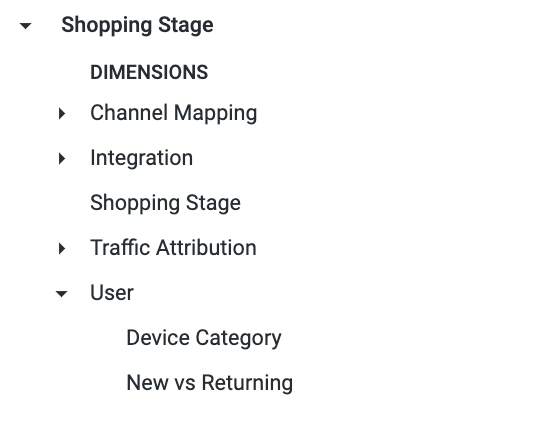
Key Dimensions
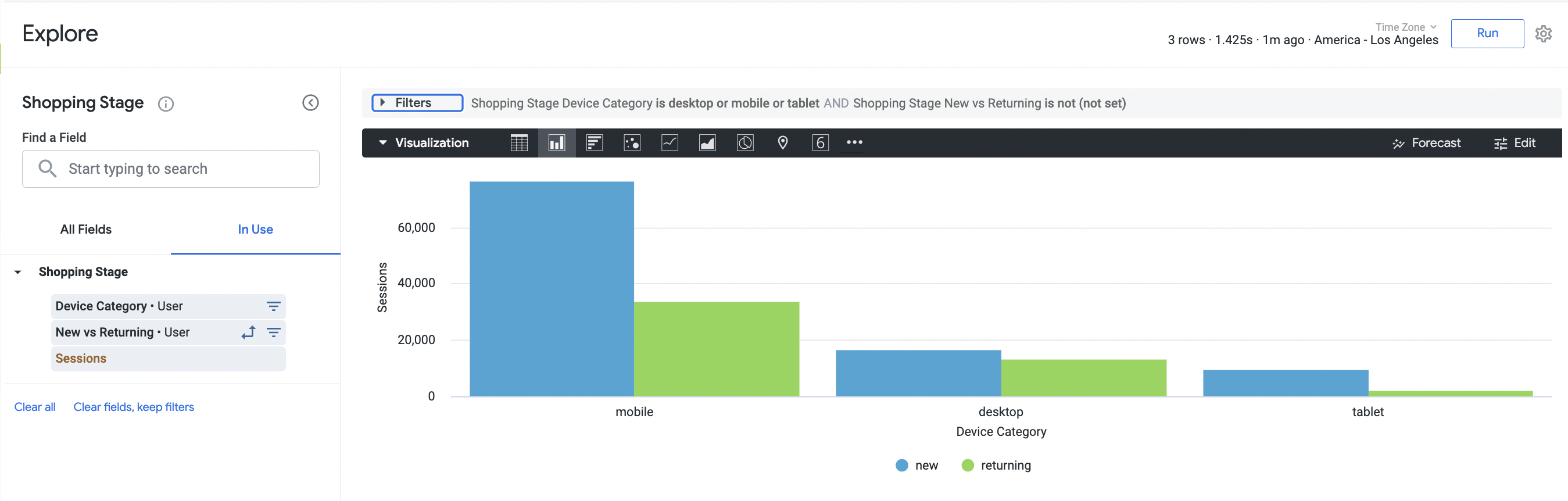
Example Report Built Using Shopping Stage Explore
{% hint style="success" %}
The above Example Report shows the Number of Sessions per Device For New and Returning Customers
{% endhint %}
## The [Site Funnels Dashboard](/core-concepts/dashboards/report-library/ecommerce-performance/site-funnels.md) is a Standard Out-of-Box Daasity Dashboard Built Using the Shopping Stage Explore