> For the complete documentation index, see [llms.txt](https://help.daasity.com/llms.txt). Markdown versions of documentation pages are available by appending `.md` to page URLs; this page is available as [Markdown](https://help.daasity.com/core-concepts/data-integrations/setup-guides/digital-integrations/cordial/integration-setup.md).
# Integration Setup
To Connect Cordial to Daasity Please follow the steps below.
{% hint style="info" %}
This integration is only available for Enterprise merchants
{% endhint %}
## Determine database type
Daasity connects to Cordial using [Snowflake Data Sharing](https://docs.snowflake.com/en/user-guide/data-sharing-intro) functionality. The Database you use will determine the setup process for your Cordial data.
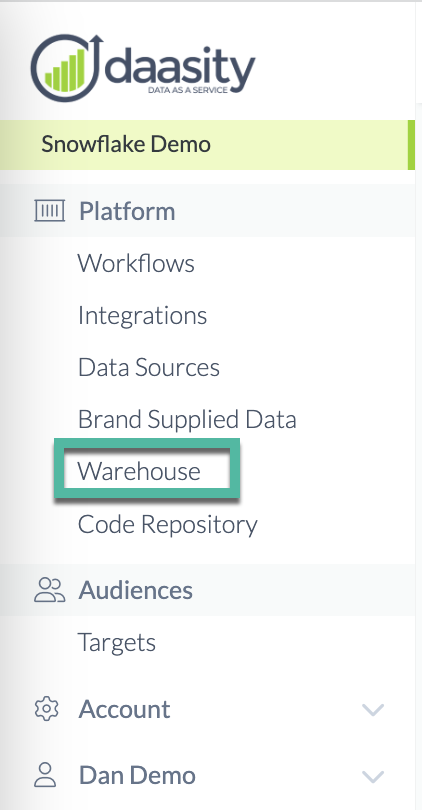
To find your Database type, navigate to the Warehouse section of the Daastiy App:
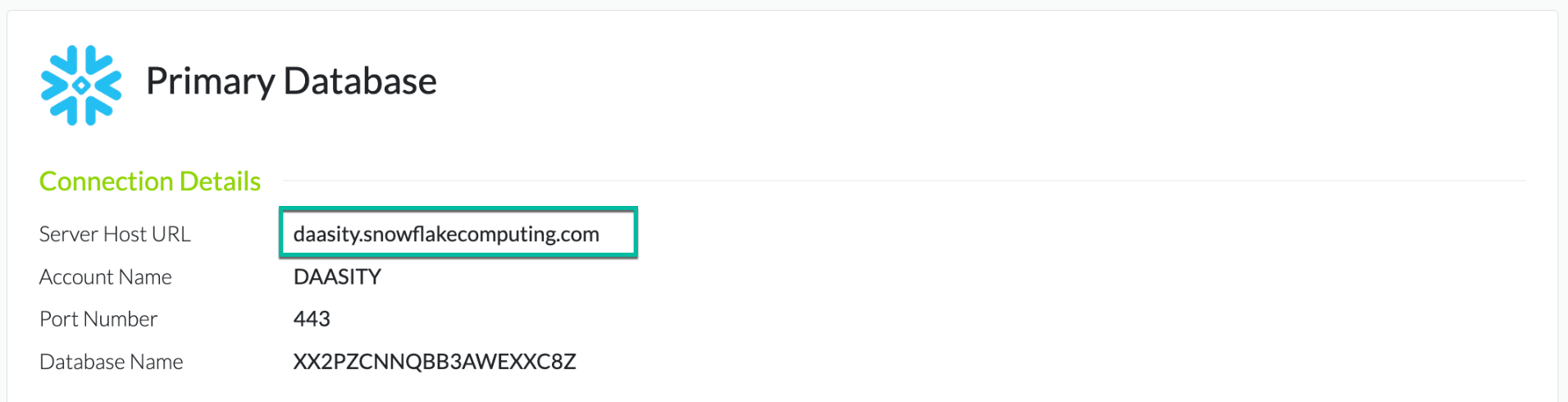
which will indicate which database you use:
* BigQuery
* Redshift
* Snowflake
## BigQuery & Redshift setup
If you use BigQuery or Redshift as your database, please contact with a request to connect Cordial to your database. Because we extract Cordial data through a Snowflake data share, Daasity will need to connect your Cordial account to the Daasity Snowflake account and then transfer data between our Snowflake and your BigQuery or Redshift account.
## Snowflake setup
There are two different setup depending on if your Snowflake account is owned by Daasity or if you own your Snowflake account.
If your database says `daasity.snowflakecomputing.com` in the Server Host URL on the Warehouse page, then your Snowflake is owned by Daasity:
### Daasity-owned Snowflake
To connect Cordial to a Daasity owned Snowflake please contact so that the Daasity team can connect your Cordial account to Snowflake.
### Merchant-owned Snowflake
To connect Cordial to your owned Snowflake account, follow the "Request a secure share" section in the [Cordial Snowflake Secure Data Sharing](https://support.cordial.com/hc/en-us/articles/9615168271629-Snowflake-Secure-Data-Sharing) article.