> For the complete documentation index, see [llms.txt](https://help.daasity.com/llms.txt). Markdown versions of documentation pages are available by appending `.md` to page URLs; this page is available as [Markdown](https://help.daasity.com/core-concepts/dashboards/report-library/utility-dashboards/account-health.md).
# Account Health
The Account Health Dashboard gives you insights into how clean and robust your data is.
The Account Health Dashboard dispalys key insights into the details of the data you are adding to your Reporting.
How Much of Your BSD have You Inputted?
The Account Health Dashboard shows you how much of your BSD Sheet you have inputted data for.
Is your Data Complete?
You can use the Channel Mapping and Channel Attribution Reports to Complete your [Channel Mapping Sheet ](/core-concepts/custom-data-and-enrichment/custom-attributes/e-commerce/channel-mapping/overview-and-setup.md)in your Brand Supplied Data.
Channel Mapping
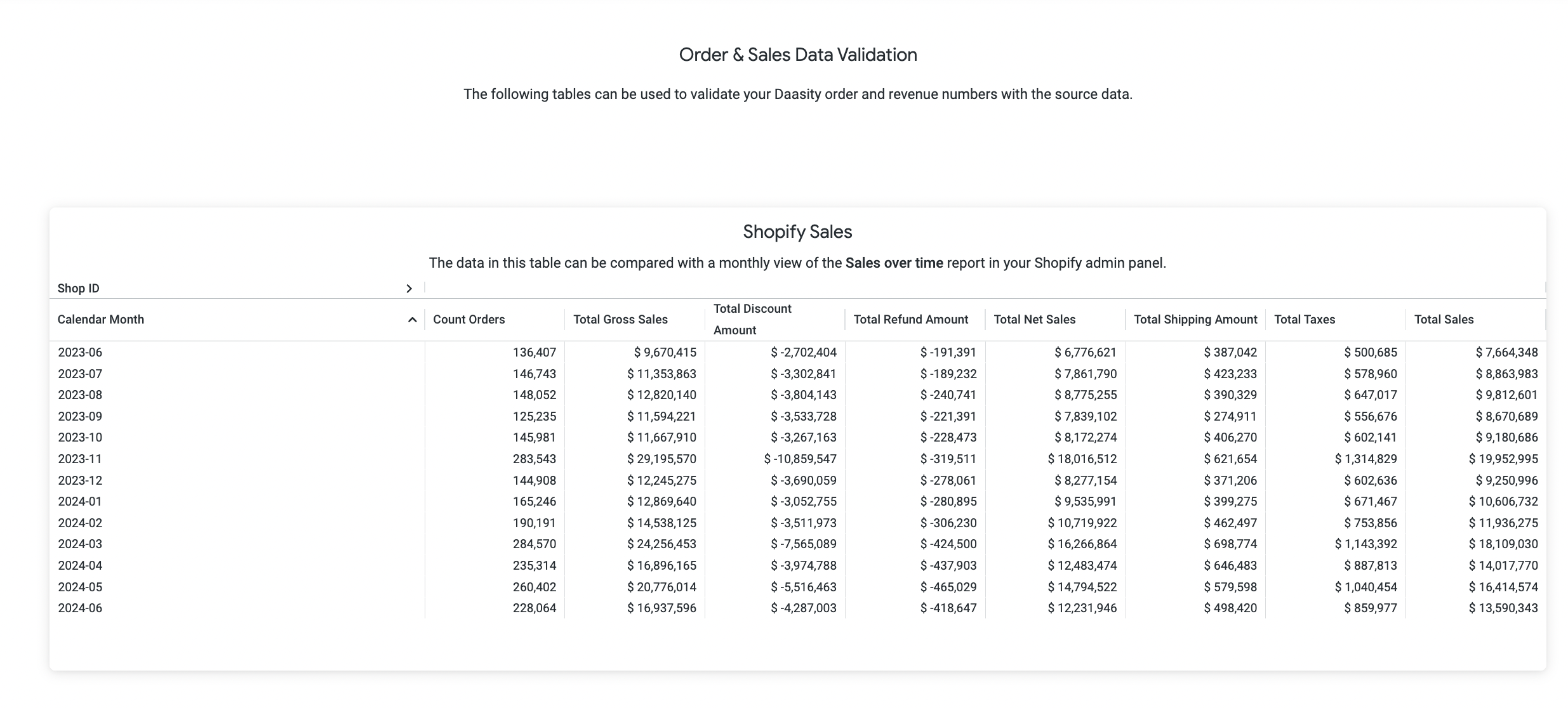
Data Validation - You can compare your Shopify and Amazon Seller Central Source Data using the pre-built reports in your Account Health Dashboard