> For the complete documentation index, see [llms.txt](https://help.daasity.com/llms.txt). Markdown versions of documentation pages are available by appending `.md` to page URLs; this page is available as [Markdown](https://help.daasity.com/core-concepts/dashboards/report-library/ecommerce-performance/fulfilment-status-options.md).
# Fulfilment Status Options
This page describes the difference in Fulfillment Status between Order and Fulfillment Sources.
In the Order & Order Revenue Line explore there are two different sources where you can get the Fulfillment Status:
1. From Fulfillment
2. From Order
## Fulfillment Status from Orders
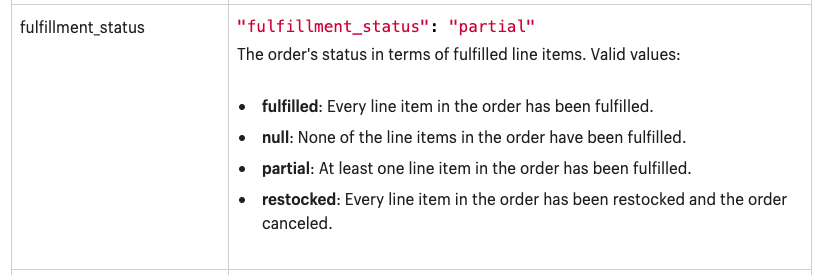
This Fulfillment Status indicates what the status of the order being fulfilled is and is based upon information that the order system has for all the different items that need to be fulfilled. In Shopify it can have the following data (This data comes from the[ Order API](/core-concepts/data-integrations/setup-guides/digital-integrations/shopify/integration-specifications.md#orders))
Order API Fulfillment
## Fulfillment Status from Fulfillments
This Fulfillment Status indicates the status of a specific fulfillment within an order. In Shopify it can have the following data (this comes from the [Fulfillment API)](/core-concepts/data-integrations/setup-guides/digital-integrations/shopify/integration-specifications.md#fulfillment-order-items):